Why You Need an ATS-Compliant Resume in 2026 (And How to Build One for Free)
75% of Resumes Are Rejected Before a Human Ever Sees Them — Is Yours One of Them?
You spent hours crafting the perfect resume. You tailored it to the job description, proofread every line, and hit "Submit" with confidence. Then... silence. No interview call. No rejection email. Just a black hole.
Here is the uncomfortable truth: your resume was likely rejected by a robot — an Applicant Tracking System (ATS) — within seconds of submission. According to multiple industry studies, over 75% of resumes are automatically filtered out before a recruiter ever lays eyes on them. And 98% of Fortune 500 companies now use ATS software to screen applications.
The good news? Building an ATS-compliant resume is not rocket science. In this comprehensive guide, we will explain exactly what ATS is, why your resume keeps getting rejected, and walk you through a step-by-step process to build a winning ATS resume for free using AI Career Insight's Resume Builder.
What Is an ATS (Applicant Tracking System)?
An Applicant Tracking System (ATS) is software that companies use to manage the entire recruitment process. When you submit your resume online — whether through LinkedIn, Naukri, Indeed, or a company's career page — it goes through an ATS before reaching a human recruiter.
Think of it as a digital gatekeeper. The ATS scans your resume, extracts key information (name, skills, experience, education), and compares it against the job description. Resumes that match well get ranked higher and forwarded to recruiters. Those that do not? They disappear into a digital void.

Popular ATS Platforms Used by Companies
| ATS Platform | Used By | Market Share |
|---|---|---|
| Workday | Amazon, Netflix, Airbnb, Deloitte | ~18% |
| Taleo (Oracle) | Coca-Cola, Boeing, HSBC | ~15% |
| Greenhouse | Spotify, Airbnb, HubSpot | ~12% |
| iCIMS | Target, UPS, Johnson & Johnson | ~10% |
| Lever | Netflix, Shopify, KPMG | ~8% |
| SAP SuccessFactors | Infosys, Wipro, TCS | ~7% |
| Freshteam | Indian startups, SMEs | Growing |
Key Insight: Each ATS parses resumes slightly differently, but they all rely on the same fundamentals — clean formatting, relevant keywords, and standard section headings. Get these right, and your resume will pass through virtually any ATS.
Why Most Resumes Fail the ATS Scan
Before we build your perfect resume, let us understand what goes wrong. Here are the most common reasons resumes get rejected by ATS:
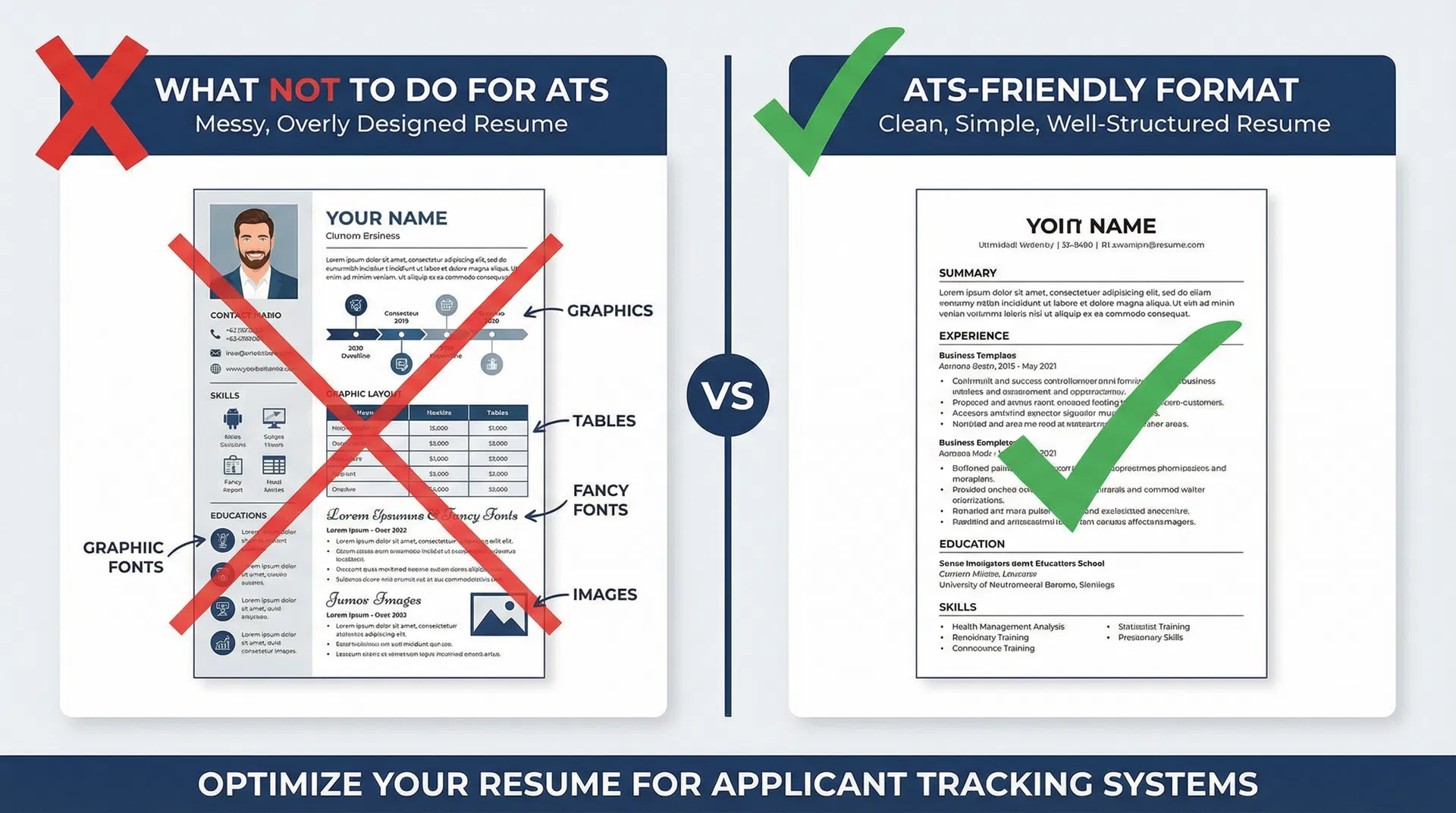
The 8 Most Common ATS Killers
| Mistake | Why It Fails | ATS-Friendly Fix |
|---|---|---|
| Fancy graphics & icons | ATS cannot read images or icons | Use plain text only |
| Tables & columns | Multi-column layouts confuse parsers | Stick to single-column format |
| Creative fonts | Decorative fonts are unreadable to ATS | Use Arial, Calibri, or Times New Roman |
| Headers & footers | Many ATS systems skip header/footer content | Put contact info in the main body |
| Missing keywords | ATS matches keywords from job description | Mirror exact terms from the posting |
| Wrong file format | Some ATS cannot parse .pages or .odt files | Submit as .docx or PDF |
| Photos & logos | ATS tries to parse images as text, causing errors | Never include photos on your resume |
| Non-standard headings | "My Journey" instead of "Work Experience" | Use standard section names |
Real-World Example: A candidate with 5 years of marketing experience applied to 200+ jobs and got zero responses. After reformatting their resume to be ATS-compliant (removing a two-column layout, adding keywords, and using standard headings), they received 12 interview calls in the next month.
The 7 Golden Rules of an ATS-Compliant Resume
Follow these seven rules, and your resume will sail through any ATS:
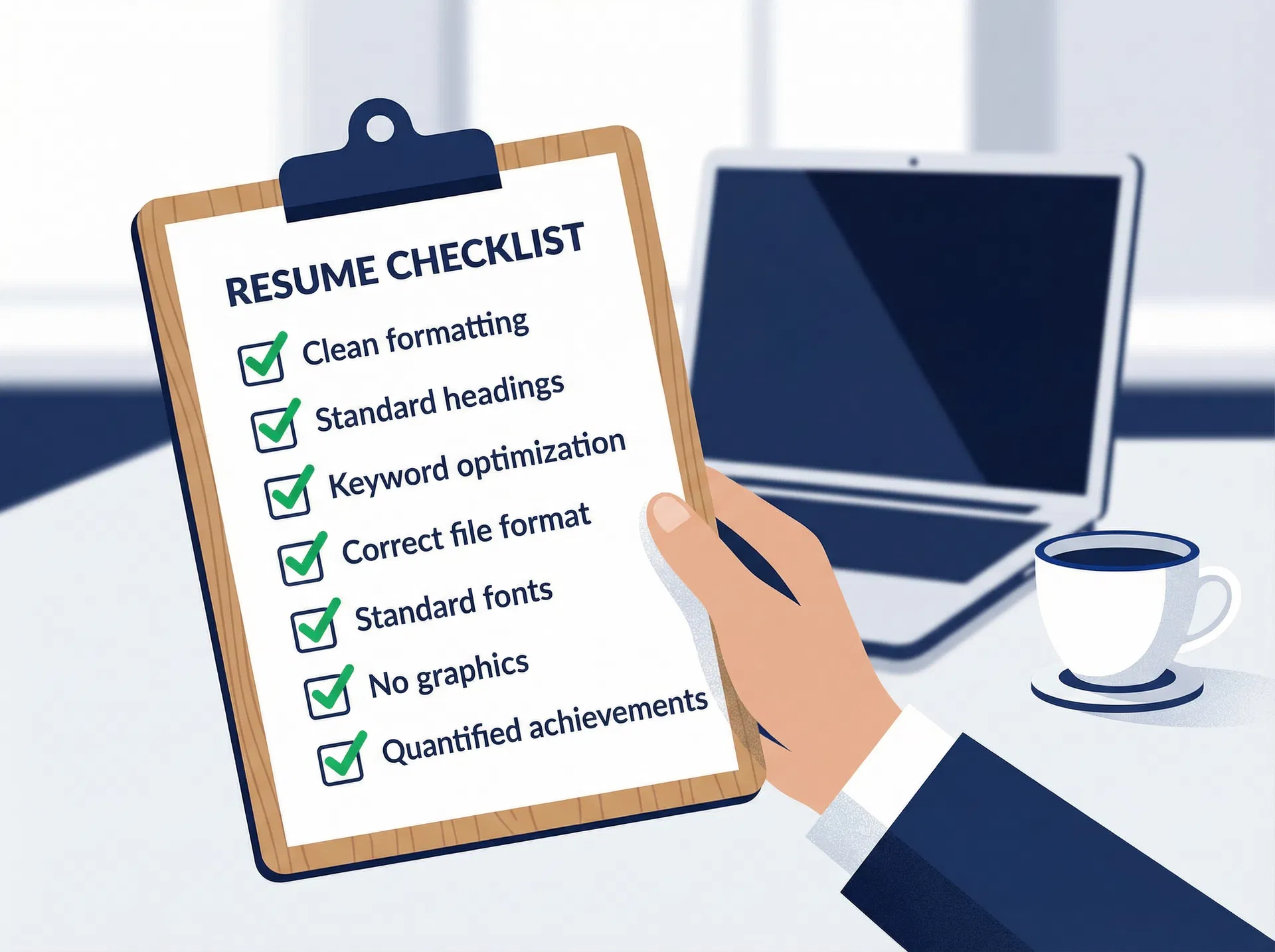
Rule 1: Use Clean, Simple Formatting
Stick to a single-column layout with clear visual hierarchy. Avoid text boxes, tables, graphics, and multi-column designs. Use standard bullet points (round dots) — not arrows, checkmarks, or custom symbols.
Rule 2: Use Standard Section Headings
ATS systems are programmed to look for specific section names. Use these exact headings:
- Professional Summary (not "About Me" or "My Story")
- Work Experience (not "Career Journey" or "Professional Timeline")
- Education (not "Academic Background")
- Skills (not "What I Bring to the Table")
- Certifications (not "Credentials & Badges")
Rule 3: Optimize for Keywords
This is the single most important factor. ATS systems rank resumes based on keyword matches with the job description. Here is how to do it right:
- Read the job description carefully — highlight repeated terms, required skills, and specific tools mentioned
- Use exact phrases — if the job says "project management," use that exact phrase, not "managing projects"
- Include both acronyms and full forms — write "Search Engine Optimization (SEO)" so the ATS catches both
- Spread keywords naturally — weave them into your summary, experience bullets, and skills section
Rule 4: Choose the Right File Format
- PDF is the safest choice for most modern ATS systems
- DOCX is the universal fallback if the job posting specifically asks for Word format
- Never submit .pages, .odt, or image-based PDFs (scanned documents)
Rule 5: Use Standard, Readable Fonts
Stick to these ATS-safe fonts in 10–12 point size:
| Safe Fonts | Avoid These |
|---|---|
| Arial | Papyrus |
| Calibri | Comic Sans |
| Times New Roman | Brush Script |
| Helvetica | Impact |
| Georgia | Decorative fonts |
Rule 6: Remove All Graphics and Images
This includes:
- Profile photos (especially common in Indian resumes — remove them)
- Company logos
- Skill bar charts or progress circles
- Icons for phone, email, or LinkedIn
- Decorative borders or dividers
Rule 7: Quantify Your Achievements
ATS systems are increasingly sophisticated. They do not just match keywords — they also evaluate the quality of your experience. Use numbers to make your achievements concrete:
- Weak: "Managed social media accounts"
- Strong: "Managed 5 social media accounts, growing followers by 150% and engagement by 80% in 6 months"
Step-by-Step: Build Your ATS Resume Using AI Career Insight's Free Resume Builder
Now let us put all of this into practice. We will walk you through building an ATS-compliant resume using AI Career Insight's Resume Builder — it is completely free and designed specifically to create ATS-optimized resumes.
Step 1: Go to the Resume Builder
Visit aicareerinsight.com/resume-builder. You will see a clean, guided interface that walks you through the entire process.
The first step asks about the job you are applying for. You have two options:
- Paste a job link — our AI will automatically extract the job title, company, and key requirements
- Paste the job description — if you have the description text, paste it directly
Pro Tip: Always start with the job description. This is how our AI identifies the exact keywords your resume needs to include to pass the ATS.
Step 2: Enter Your Personal Information
Fill in your basic details:
- Full name
- Email address
- Phone number
- City/Location
- LinkedIn profile URL (optional but recommended)
Our builder formats this information in a clean, ATS-readable layout — no fancy headers or graphics.
Step 3: Add Your Work Experience
This is where the magic happens. For each role, enter:
- Job title (use the standard industry title)
- Company name
- Duration (month and year)
- Key responsibilities and achievements
Our AI will analyze the job description you provided in Step 1 and suggest keyword-optimized bullet points for your experience. It ensures your language matches what the ATS is looking for.
Step 4: Add Education and Certifications
Enter your educational background:
- Degree name
- Institution
- Graduation year
- Relevant coursework or projects (for freshers)
Add any certifications that are relevant to the role — the ATS specifically scans for these.
Step 5: Add Your Skills Section
Our AI automatically suggests skills based on the job description. You can:
- Accept the AI-suggested skills
- Add your own additional skills
- Remove skills that do not apply
The skills section is critical for ATS matching — make sure it includes both hard skills (Python, Excel, AutoCAD) and soft skills (leadership, communication) that appear in the job posting.
Step 6: Review Your ATS-Optimized Resume
Before downloading, review your resume in our preview. The AI has already:
- Formatted everything in a clean, single-column layout
- Used standard section headings
- Incorporated relevant keywords from the job description
- Ensured proper font sizing and spacing
- Removed any ATS-unfriendly elements
Step 7: Download as PDF
Click "Download" to get your ATS-optimized resume as a clean PDF. The file is formatted to be:
- Parseable by all major ATS platforms
- Visually clean for human recruiters
- Properly structured with searchable text (not an image-based PDF)
ATS Resume Checklist: Use This Before Every Application
Before you submit your next job application, run through this checklist:
| Check | Item | Status |
|---|---|---|
| 1 | Single-column layout with no tables or text boxes | Required |
| 2 | Standard section headings (Work Experience, Education, Skills) | Required |
| 3 | Keywords from the job description included naturally | Critical |
| 4 | Standard font (Arial, Calibri, Times New Roman) at 10-12pt | Required |
| 5 | No images, photos, logos, or graphics | Required |
| 6 | Contact information in the main body (not header/footer) | Required |
| 7 | File saved as PDF or DOCX | Required |
| 8 | Achievements quantified with numbers and percentages | Recommended |
| 9 | Both acronyms and full forms included (e.g., SEO + Search Engine Optimization) | Recommended |
| 10 | Resume length is 1-2 pages maximum | Recommended |
ATS Resume Template: Ready to Use
If you want a quick reference, here is the ideal ATS resume structure:
[YOUR FULL NAME] City, State | Phone Number | [email protected] | linkedin.com/in/yourprofile
PROFESSIONAL SUMMARY [2-3 sentences highlighting your experience, key skills, and what you bring to the role. Include 2-3 keywords from the job description.]
WORK EXPERIENCE
Job Title | Company Name | City | Month Year – Present
- [Achievement with quantified result using keywords from job description]
- [Achievement with quantified result]
- [Responsibility demonstrating relevant skill]
Previous Job Title | Company Name | City | Month Year – Month Year
- [Achievement with quantified result]
- [Achievement demonstrating relevant skill]
EDUCATION
Degree Name | Institution Name | Graduation Year
- Relevant coursework: [List if you are a fresher]
SKILLS
[Skill 1] | [Skill 2] | [Skill 3] | [Skill 4] | [Skill 5] | [Skill 6]
CERTIFICATIONS
- [Certification Name] — [Issuing Organization] — [Year]
Bonus: How to Check Your Resume's ATS Score
After building your resume, you can use AI Career Insight's Resume Analysis tool to check how ATS-friendly it is. Our AI analyzes your resume against the job description and provides:
- ATS Compatibility Score — how well your resume will perform in ATS screening
- Keyword Match Analysis — which important keywords are present and which are missing
- Formatting Check — identifies any formatting issues that could cause ATS problems
- Improvement Suggestions — specific, actionable tips to boost your score
Tip: Aim for an ATS score of 80% or higher before submitting your application. Even small improvements in keyword matching can dramatically increase your chances.
Frequently Asked Questions
What is an ATS-compliant resume?
An ATS-compliant resume is formatted and written in a way that Applicant Tracking Systems can easily parse and understand. It uses clean formatting, standard section headings, relevant keywords, and avoids graphics, tables, and fancy fonts that confuse ATS software.
Is a PDF or DOCX better for ATS?
PDF is generally the safest choice for modern ATS systems. However, some older systems prefer DOCX. If the job posting specifies a format, always follow those instructions. When in doubt, PDF works with most systems built after 2020.
Can I use colors in an ATS resume?
You can use minimal color (such as dark blue for headings) without affecting ATS parsing. However, avoid using color as the only way to convey information (like red text for important skills), as ATS systems do not interpret colors. When in doubt, stick to black text.
How do I find the right keywords for my resume?
Read the job description carefully and identify: (1) required skills and tools mentioned, (2) repeated phrases and terms, (3) industry-specific jargon, and (4) qualifications and certifications listed. Use these exact terms in your resume. Our Resume Builder does this automatically by analyzing the job description you provide.
Is AI Career Insight's resume builder really free?
Yes, completely free. You can build unlimited ATS-optimized resumes, get AI-powered keyword suggestions, and download your resume as a PDF — all without paying anything. No hidden charges, no premium lock, no credit card required.
How many keywords should I include in my resume?
There is no magic number, but aim to include 15-25 relevant keywords naturally throughout your resume. Focus on the most important ones — those that appear multiple times in the job description or are listed as "required" qualifications.
Should freshers use the same ATS format?
Absolutely. The ATS does not care about your experience level — it scans all resumes the same way. Freshers should focus on relevant coursework, projects, internships, and skills. Our Resume Builder is especially helpful for freshers because the AI helps generate professional bullet points even with limited experience.
Start Building Your ATS Resume Now — It Is Free
Every day you apply with a non-ATS-compliant resume is a day wasted. The ATS is not going away — in fact, with AI-powered recruitment tools becoming more sophisticated, having an optimized resume is more important than ever.
Build Your Free ATS Resume Now →
Our AI-powered Resume Builder will:
- Analyze the job description for critical keywords
- Generate ATS-optimized content for your experience
- Format everything in a clean, parseable layout
- Let you download a professional PDF — completely free
Stop letting robots reject your resume. Build your ATS-compliant resume today and start landing the interviews you deserve.
This guide was written by the AI Career Insight team. We are on a mission to help students, freshers, and professionals navigate the modern job market with AI-powered tools. Have questions? Contact us.